Guide to Migrating Data from MySQL to PostgreSQL by utilizing Airflow’s Directed Acyclic Graph (DAG).
Introduction
Apache Airflow: A Powerful Platform for Workflow Orchestration
Apache Airflow is an open-source platform designed for programmatically authoring, scheduling, and
monitoring workflows. It is widely recognized as the go-to tool for orchestrating data pipelines,
enabling organizations to automate complex workflows with ease and scalability.
Guide: Migrating Data from MySQL to PostgreSQL Using Apache Airflow
In this guide, we’ll walk you through the process of migrating data from MySQL to PostgreSQL
using Apache Airflow. By leveraging the power of Directed Acyclic Graphs (DAGs), you can create a
robust, automated, and scalable solution for seamless data migration.
Scenario Overview: Data Migration from MySQL to PostgreSQL
Objective:
We will migrate data from the employees table in the sampleDB database of
MySQL to the companydb database in PostgreSQL.
This process ensures that your data is efficiently transferred while maintaining integrity and consistency across databases.
Whether you're consolidating databases, upgrading systems, or integrating data sources, this guide provides a
clear, step-by-step approach to achieve your goals.
Step 1: Verify Source and Prepare Target
-
Verify Source Data in MySQL
To confirm the data in the source table, execute the following query in the MySQL CLI:mysql> select * from sampleDB.employees limit 2;Output:+------------+--------+------------+-----------------+----------+---------------+-------------------+-----------+ | first_name | gender | start_date | last_login_time | salary | bonus_percent | senior_management | team | +------------+--------+------------+-----------------+----------+---------------+-------------------+-----------+ | Douglas | Male | 1993-08-06 | 12:42:00 | 97308.00 | 6.945 | 1 | Marketing | | Thomas | Male | 1996-03-31 | 06:53:00 | 61933.00 | 4.170 | 1 | | +------------+--------+------------+-----------------+----------+---------------+-------------------+-----------+ 2 rows in set (0.03 sec) -
Prepare the Target Database in PostgreSQL
-
Access PostgreSQL CLI:
Open your terminal and log in to the PostgreSQL CLI using the following command:sudo -u postgres psql -
Create the companydb database in the PostgreSQL CLI:
postgres=# CREATE DATABASE companydb;Output:
CREATE DATABASE -
Verify existing tables in companydb:
Conect to the database:postgres=# \c companydb;Output:You are connected to database "companydb" as user "postgres" companydb=#Verify existing tables in companydb:
companydb=# \dt;Output:Did not find any relations. companydb=#
-
Access PostgreSQL CLI:
Step 2: Create the DAG File
Create a new Python file named export_mysql_to_postgres.py in your Airflow DAGs folder (/airflow/dags/). You can use any text editor or IDE (e.g., nano, vim, PyCharm).
Step 3: Import Required Libraries
Import necessary libraries and modules for the DAG.
import pendulum
from airflow import DAG
from airflow.providers.common.sql.operators.sql import SQLExecuteQueryOperator
from airflow.providers.mysql.hooks.mysql import MySqlHook
from airflow.providers.postgres.hooks.postgres import PostgresHook
from airflow.providers.standard.operators.python import PythonOperator
from datetime import timedelta, datetime, time
import decimal
Step 4: Define Default Arguments
Set default arguments for the DAG, including owner, retries, and retry delay.
default_args = {
    'owner': 'data_engineering',
    'retries': 1,
    'retry_delay': timedelta(minutes=5),
}
Note: Additional arguments like email, email_on_failure, and depends_on_past are commented out but can be enabled as needed.
Step 5: Define the DAG
Define the DAG with its ID, default arguments, schedule, start date, timeout, and description.
dag_export_mysql_to_postgres = DAG(
    dag_id='export_mysql_to_postgres',
    default_args=default_args,
    schedule='@once',
    start_date=pendulum.yesterday('Asia/Dhaka'),
    dagrun_timeout=timedelta(minutes=60),
    description='Transfer data from MySQL to PostgreSQL for employees table',
)
Step 6: Define MySQL Query
Define the SQL query to fetch data from MySQL.
mysql_query = """
SELECT
    first_name,
    gender,
    start_date,
    last_login_time,
    salary,
    bonus_percent,
    senior_management,
    team
FROM
    sampleDB.employees;
"""
Step 7: Create PostgreSQL Table
Create a task to create the PostgreSQL table with the appropriate schema.
create_postgres_table = SQLExecuteQueryOperator(
    task_id="create_postgres_table",
    conn_id="postgres_default",
    sql="""
    CREATE TABLE IF NOT EXISTS employees (
        first_name VARCHAR(255),
        gender VARCHAR(50),
        start_date DATE,
        last_login_time TIME,
        salary DECIMAL(10,2),
        bonus_percent DECIMAL(5,2),
        senior_management INTEGER,
        team VARCHAR(255)
    );
    """,
    dag=dag_export_mysql_to_postgres,
)
Step 8: Clear Existing Data (Optional)
Create a task to clear existing data from the PostgreSQL table.
clear_table = SQLExecuteQueryOperator(
    task_id="clear_table",
    conn_id="postgres_default",
    sql="TRUNCATE TABLE employees;",
    dag=dag_export_mysql_to_postgres,
)
Step 9: Define Data Transfer Function
Define a Python function to transfer data from MySQL to PostgreSQL.
def transfer_mysql_to_postgres(**context):
    mysql_hook = MySqlHook(mysql_conn_id='mysql_default')
    records = mysql_hook.get_records(mysql_query)

    print(f"Fetched {len(records)} records from MySQL")

    postgres_hook = PostgresHook(postgres_conn_id='postgres_default')
    postgres_conn = postgres_hook.get_conn()
    postgres_cursor = postgres_conn.cursor()

    insert_query = """
        INSERT INTO employees
        (first_name, gender, start_date, last_login_time, salary, bonus_percent, senior_management, team)
        VALUES (%s, %s, %s, %s, %s, %s, %s, %s)
    """

    for record in records:
        start_date_value = record[2]
        last_login_time_value = record[3]

        if isinstance(last_login_time_value, timedelta):
            total_seconds = int(last_login_time_value.total_seconds())
            hours = total_seconds // 3600
            minutes = (total_seconds % 3600) // 60
            seconds = total_seconds % 60
            last_login_time = time(hour=hours, minute=minutes, second=seconds)
        else:
            last_login_time = last_login_time_value

        salary_value = float(record[4]) if record[4] is not None else None
        bonus_percent_value = float(record[5]) if record[5] is not None else None

        if isinstance(salary_value, decimal.Decimal):
            salary_value = float(salary_value)
        if isinstance(bonus_percent_value, decimal.Decimal):
            bonus_percent_value = float(bonus_percent_value)

        values = (
            record[0],
            record[1],
            start_date_value,
            last_login_time,
            salary_value,
            bonus_percent_value,
            int(record[6]) if record[6] is not None else None,
            record[7]
        )
        postgres_cursor.execute(insert_query, values)

    postgres_conn.commit()
    postgres_cursor.close()
    postgres_conn.close()
Step 10: Define Data Transfer Task
Create a task to perform the data transfer using the Python function.
transfer_data = PythonOperator(
    task_id='transfer_data',
    python_callable=transfer_mysql_to_postgres,
    dag=dag_export_mysql_to_postgres,
)
Step 11: Set Task Dependencies
Define the order in which tasks should run.
create_postgres_table >> clear_table >> transfer_data
Final DAG File
import pendulum
from airflow import DAG
from airflow.providers.common.sql.operators.sql import SQLExecuteQueryOperator
from airflow.providers.mysql.hooks.mysql import MySqlHook
from airflow.providers.postgres.hooks.postgres import PostgresHook
from airflow.providers.standard.operators.python import PythonOperator
from datetime import timedelta, datetime, time
import decimal

default_args = {
    'owner': 'Md Abdul Latif',
    'retries': 1,
    'retry_delay': timedelta(minutes=5)
}

dag_export_mysql_to_postgres = DAG(
    dag_id='export_mysql_to_postgres',
    default_args=default_args,
    schedule='@once',
    start_date=pendulum.yesterday('Asia/Dhaka'),
    dagrun_timeout=timedelta(minutes=60),
    description='Transfer data from MySQL to PostgreSQL for employees table for Md Abdul Latif\'s organization',
)

mysql_query = """
SELECT
    first_name,
    gender,
    start_date,
    last_login_time,
    salary,
    bonus_percent,
    senior_management,
    team
FROM
    sampleDB.employees;
"""

create_postgres_table = SQLExecuteQueryOperator(
    task_id="create_postgres_table",
    conn_id="postgres_default",
    sql="""
    CREATE TABLE IF NOT EXISTS employees (
        first_name VARCHAR(255),
        gender VARCHAR(50),
        start_date DATE,
        last_login_time TIME,
        salary DECIMAL(10,2),
        bonus_percent DECIMAL(5,2),
        senior_management INTEGER,
        team VARCHAR(255)
    );
    """,
    dag=dag_export_mysql_to_postgres,
)

clear_table = SQLExecuteQueryOperator(
    task_id="clear_table",
    conn_id="postgres_default",
    sql="TRUNCATE TABLE employees;",
    dag=dag_export_mysql_to_postgres,
)

def transfer_mysql_to_postgres(**context):
    mysql_hook = MySqlHook(mysql_conn_id='mysql_default')
    records = mysql_hook.get_records(mysql_query)

    print(f"Fetched {len(records)} records from MySQL")

    postgres_hook = PostgresHook(postgres_conn_id='postgres_default')
    postgres_conn = postgres_hook.get_conn()
    postgres_cursor = postgres_conn.cursor()

    insert_query = """
        INSERT INTO employees
        (first_name, gender, start_date, last_login_time, salary, bonus_percent, senior_management, team)
        VALUES (%s, %s, %s, %s, %s, %s, %s, %s)
    """

    for record in records:
        start_date_value = record[2]
        last_login_time_value = record[3]

        if isinstance(last_login_time_value, timedelta):
            total_seconds = int(last_login_time_value.total_seconds())
            hours = total_seconds // 3600
            minutes = (total_seconds % 3600) // 60
            seconds = total_seconds % 60
            last_login_time = time(hour=hours, minute=minutes, second=seconds)
        else:
            last_login_time = last_login_time_value

        salary_value = float(record[4]) if record[4] is not None else None
        bonus_percent_value = float(record[5]) if record[5] is not None else None

        if isinstance(salary_value, decimal.Decimal):
            salary_value = float(salary_value)
        if isinstance(bonus_percent_value, decimal.Decimal):
            bonus_percent_value = float(bonus_percent_value)

        values = (
            record[0],
            record[1],
            start_date_value,
            last_login_time,
            salary_value,
            bonus_percent_value,
            int(record[6]) if record[6] is not None else None,
            record[7]
        )
        postgres_cursor.execute(insert_query, values)

    postgres_conn.commit()
    postgres_cursor.close()
    postgres_conn.close()

    print(f"Successfully transferred {len(records)} records to PostgreSQL")

transfer_data = PythonOperator(
    task_id='transfer_data',
    python_callable=transfer_mysql_to_postgres,
    dag=dag_export_mysql_to_postgres,
)

create_postgres_table >> clear_table >> transfer_data
Step 10: Create Connections
Configure Airflow Connections for MySQl and PostgreSQL.
-
Go to the Airflow UI.
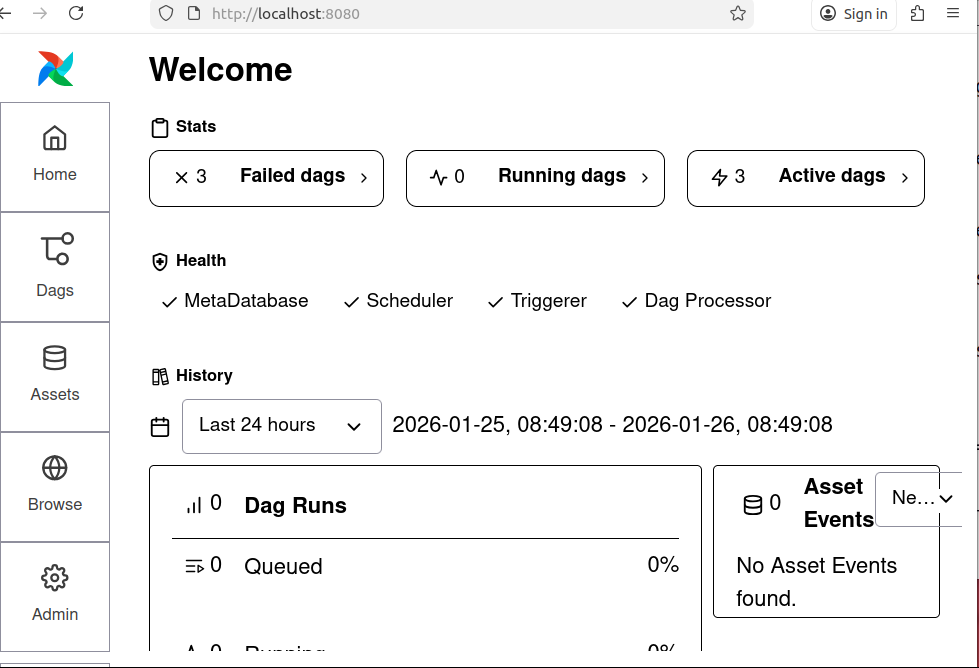
Figure: 1. Airflow UI -
Navigate to Admin > Connections > Add Connection
Connection 1: for MySQL:
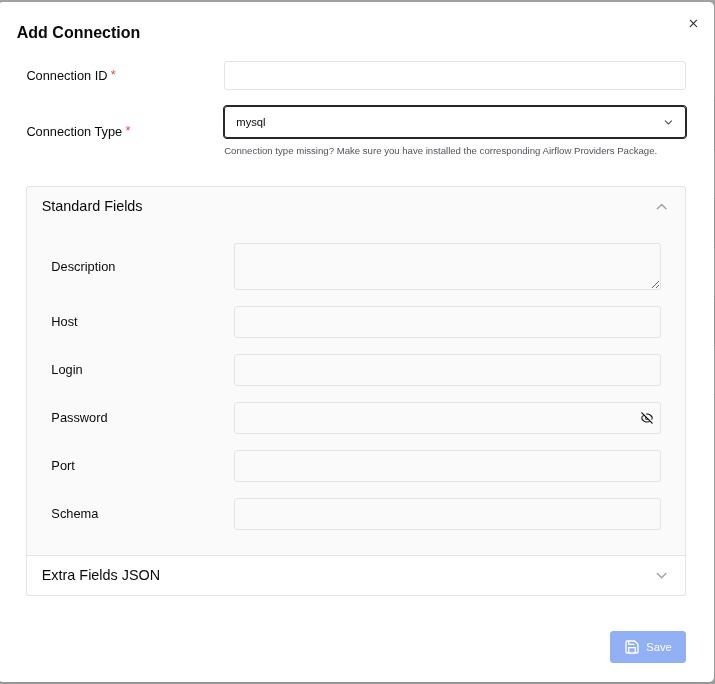
Figure: 2. Add Connection
To populate the Airflow MySQL connection form correctly, follow these steps based on Figure: 2. Add Connection:
- Connection ID: mysql_default
- Connection Type: mysql
Fill in the fields as follows:
- Description: (Optional) You can add a description like "Connection to MySQL for Airflow tasks."
-
Host: localhost
(If your MySQL server is running on the same machine as Airflow, use localhost. If it's on a different server, use the IP address or hostname of that server.) - Login: root
(User of mysql. If you use other user then use it.) -
Password:
(Use the password you set for the user in MySQL.) -
Port: 3306
(This is the default MySQL port. Change it if your MySQL server uses a different port.) - Schema: sampleDB (This is the default database schema Airflow will use for this connection. Replace sampleDB with the actual database name you want to connect to.)
Additional Fields (if available)
If there are additional fields like Extra, you can leave them empty unless you have specific
connection parameters to add (e.g., SSL settings, connection timeouts).
Save the Connection
After filling in the fields, click Save to store the connection in Airflow.
Connection 2: for PostgreSQL:
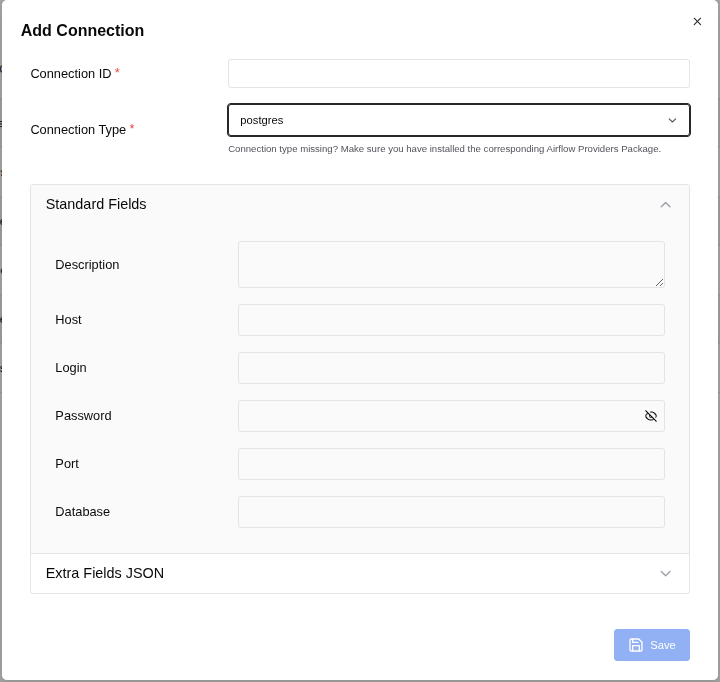
To fill in the fields for your PostgreSQL connection in Airflow, use the following details based on the image (Figure: 3. Add Connection) and typical PostgreSQL configurations:
- Connection ID: postgres_default (This is the identifier for the connection in Airflow.)
- Connection Type: postgres (This specifies that the connection is for PostgreSQL.)
Standard Fields
- Description: (Optional) You can add a description like "Connection to PostgreSQL for Airflow tasks."
- Host: localhost (If your PostgreSQL server is running on the same machine as Airflow, use localhost. If it's on a different server, use the IP address or hostname of that server.)
- Login: postgres (This is the username for connecting to PostgreSQL.)
- Password: (Enter the password for your_postgres_password.)
- Port: 5432 (This is the default port for PostgreSQL.)
- Schema: companydb (This is the default database schema Airflow will use for this connection. Replace it with the database name.)
Additional Configuration (if needed)
- If there are any additional parameters required for your PostgreSQL connection (e.g., SSL settings, additional configuration parameters), you can add them in the Extra field (usually in JSON format).
Now we can see connections as following:
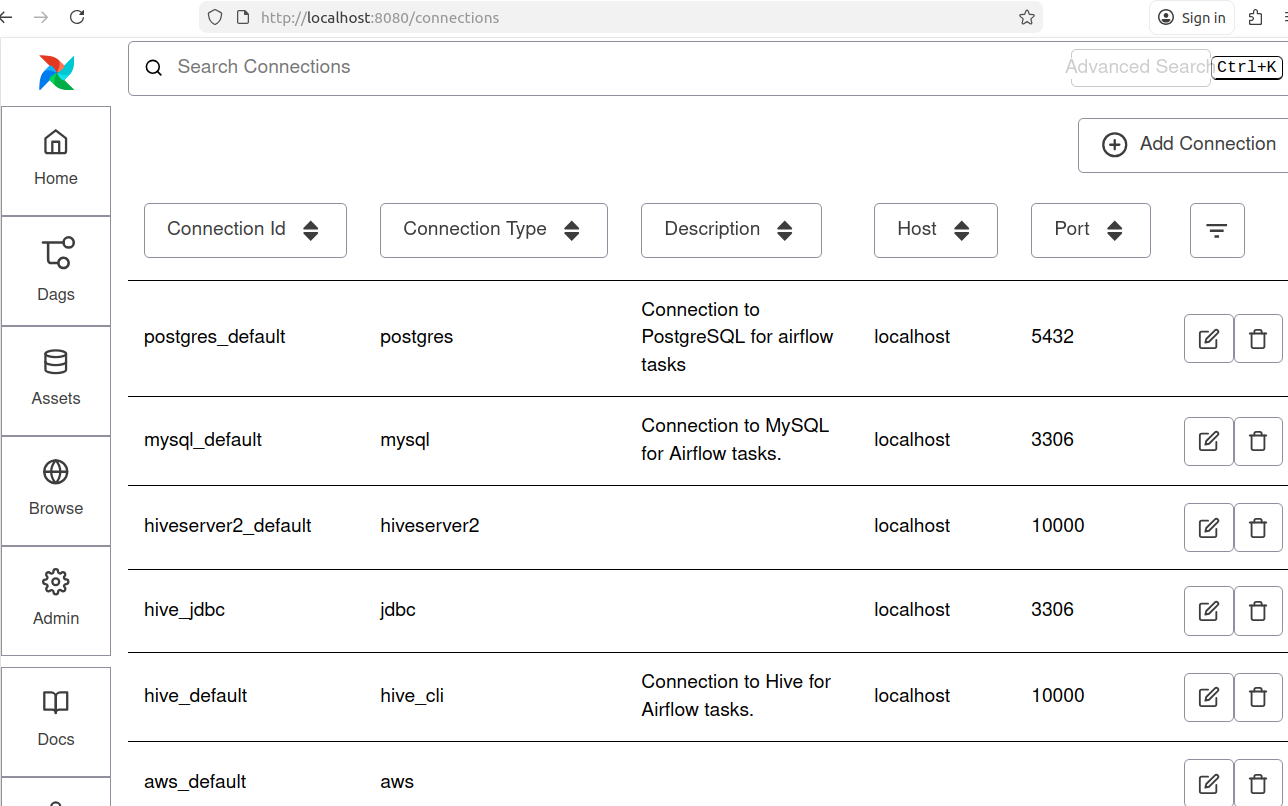
Note: For this project Connection Id for MySQl: mysql_default and Connection Id for PostgreSQL: postgres_default are shown in the Figure: 4.
Step 11: Verify the task
On the screen, you can observe the Task ID "export_mysql_to_postgres" within the Airflow Directed Acyclic Graph (DAG) in its idle state, indicating(red arrow) that the task has not yet been executed.
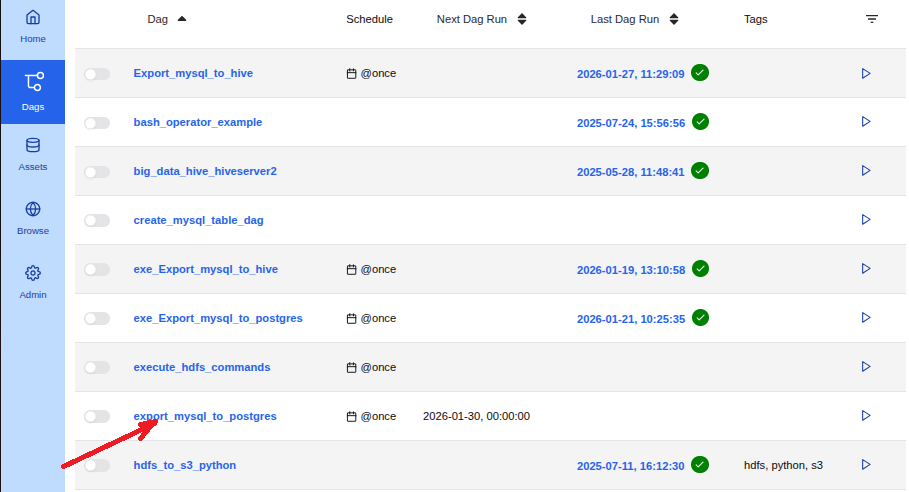
Note: Red arrow indicates in Figure: 5.
Step 12: Execute the DAG
To start the execution of the DAG, follow these steps:
-
Trigger the DAG:
- Locate the DAG ID "export_mysql_to_postgres" in the Airflow web interface.
- Click the "Trigger DAG" button, indicated by an arrowhead (>), located at the right corner of the red arrow indicated row of the screen (refer to Figure 5).
-
Wait for Completion:
Allow the process to complete. You will see the progress in the Airflow interface.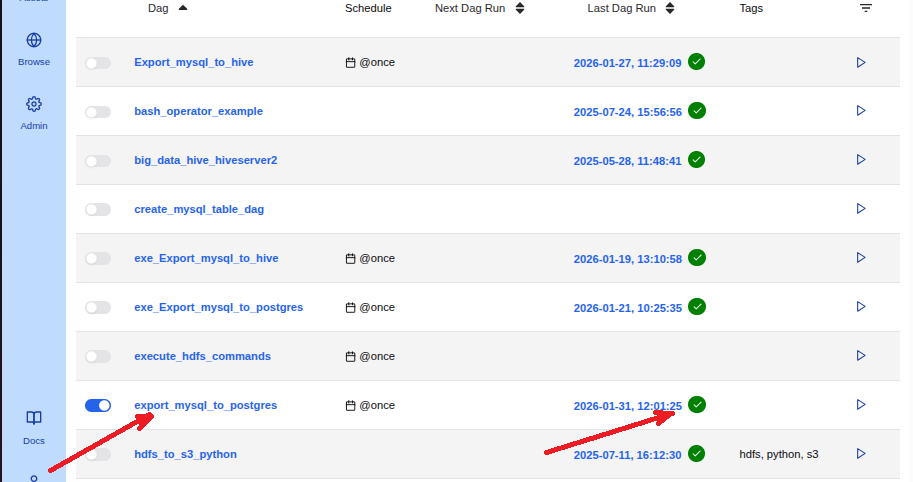
Figure: 6. export_mysql_to_postgres in its executed state -
Verify Successful Completion:
- Once the process is successfully completed, a white checkmark within a green circle will appear on the right side of the datetime at the red arrow indicated row of the screen (refer to Figure 6).
By following these steps, you ensure that the DAG is executed correctly and monitor its successful completion.
Step 13: Verify Data Transfer to PostgreSQL.
To confirm that the employees table data has been successfully transferred from MySQL to the PostgreSQL database companydb, follow these steps:
-
Access PostgreSQL:
Open your PostgreSQL interface (e.g., PostgreSQL CLI). -
Switch to the companydb Database:
postgres=# \c companydb;Output:You are now connected to database "companydb" as user "postgres". companydb=# -
Check the employees Table:
companydb=# \dt;Output:List of relations Schema | Name | Type | Owner --------+-----------+-------+---------- public | employees | table | postgres (1 row)Ensure that the employees table is listed. -
Preview the Data:
companydb=# SELECT * FROM employees LIMIT 5;Output:first_name | gender | start_date | last_login_time | salary | bonus_percent | senior_management | team ------------+--------+------------+-----------------+-----------+---------------+-------------------+----------------- Douglas | Male | 1993-08-06 | 12:42:00 | 97308.00 | 6.95 | 1 | Marketing Thomas | Male | 1996-03-31 | 06:53:00 | 61933.00 | 4.17 | 1 | Maria | Female | 1993-04-23 | 11:17:00 | 130590.00 | 11.86 | 0 | Finance Jerry | Male | 2005-03-04 | 13:00:00 | 138705.00 | 9.34 | 1 | Finance Larry | Male | 1998-01-24 | 16:47:00 | 101004.00 | 1.39 | 1 | Client Services (5 rows)Verify that the data matches the records from your MySQL employees table.
By performing these checks, you can confirm that the data has been correctly dumped from MySQL to PostgreSQL.
Conclusion
This article illustrates the process of migrating data from MySQL to PostgreSQL using Apache Airflow’s workflow orchestration capabilities.

Image:freepik